


Omoi: Manga Reader
4.541.00 Reviews
App Specs
- Version
- 4.0.2
- Updated On
- License
- Free
- Downloads
- 100,000+
- Developer
- KiraKira Media Inc.
- Categories
- Comics
- Platform
- Android, iOS
Screenshots

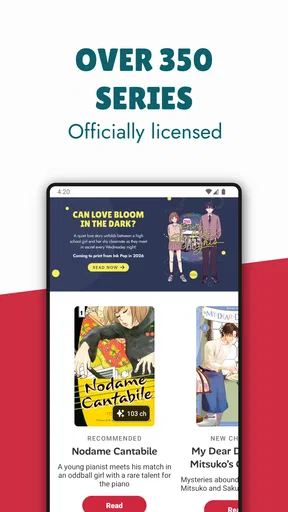
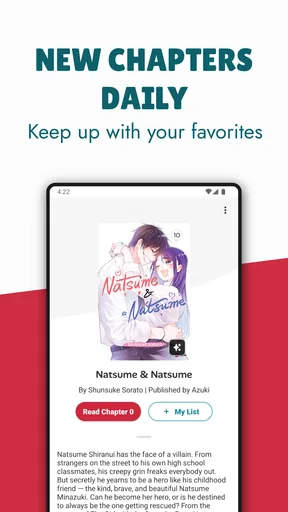



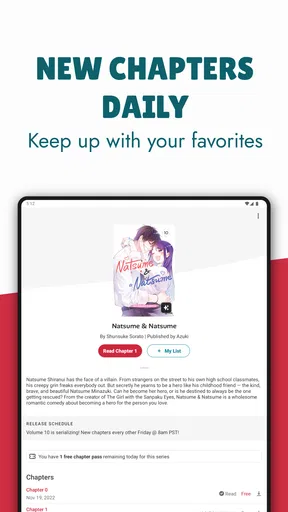

 Analysis by AppCompare
If you're anything like me and have a passion for manga, then you'll know how important it is to have a good manga reader app. Enter Omoi: Manga Reader, your new best friend in the manga universe. I’ve had the chance to dive into this app, and honestly, it’s been quite an adventure. Let me walk you through my experience with it.
Why the reading setup matters
I find a manga reader is only as comfortable as its page presentation. Small print, busy panel layouts, and long sessions can make a phone tiring, so the ability to adjust reading settings matters more to me than a flashy home screen. In Omoi, the available choices include left-to-right or right-to-left reading, plus brightness, contrast, and text-size adjustments. Those controls give me a practical starting point for making a page easier to follow, though they cannot change the artwork itself or make every title equally comfortable on every screen.
My useful habit is to set the reading direction before settling into a series, then make small display adjustments on a sample page rather than changing several things at once. That makes it easier to tell whether a page feels clearer because of the direction, brightness, or contrast. For dense pages, I also prefer to pause and zoom in if needed rather than force a long stretch of squinting. This is a simple workflow, but it helps turn adjustable settings into something useful instead of leaving them as options I never revisit.
Getting Started with Omoi
First things first, downloading Omoi: Manga Reader was a breeze. Available on both Android and iOS, the app is just a quick search away in your device’s app store. Once installed, you’re greeted with a neat and straightforward interface. It’s refreshing to see an app that doesn’t bombard you with unnecessary clutter right from the get-go.
For context, Omoi is a free comics app from KiraKira Media Inc., focused on licensed manga rather than functioning as a general-purpose reader for any file you happen to own. Its Teen age rating is useful to keep in mind when choosing something to read with a younger person: I would still check an individual series before handing over a device, since a broad rating does not tell me whether a particular story suits every reader. The app has a 4.5 average from 642 ratings, and it has passed 100K installs, which suggests a sizeable audience without telling me whether its catalog will match any one reader’s tastes.
The app offers a simple tutorial when you first open it, which is super helpful if you’re new to digital manga reading. Even if you’re a seasoned pro, this little walkthrough ensures you don’t miss out on any cool features.
Readability and navigation in daily use
Omoi’s approach makes the most sense when I treat the app as both a reading space and a way to keep a few ongoing series organized. The custom lists are useful for separating books I have finished from those I am following and titles I want to try next. That distinction saves me from relying on memory, especially when I have sampled several series and do not want to reopen each one just to remember where it fits in my reading queue.
Worth Reading Before You Choose

Flipboard Shows What News Apps Must Do Beyond the Feed

Switching to Android Auto Means Rethinking Your Driving Routine

Google Calendar Makes a Crowded Week Easier to Manage

Ludo King Makes the Most of the Minutes Between Plans

Baby Panda World Brings Quick Play to Modern Phones, but Its Game Library Feels Busy

ESPN’s Live Game View Makes Following Close Games Easier
A small but worthwhile routine is to use one list for active reading and another for things I am merely curious about. When a recommendation catches my eye, I can park it for later instead of letting it interrupt the story I am already reading. This is a better fit for readers who like to browse in short bursts and then return to a chosen series. If you prefer a single, tightly controlled reading queue, custom lists can help; if you want a highly automated collection that manages every detail for you, this simpler organization may feel limited.
The Features You’ll Love
Omoi truly shines with its wide range of features designed to enhance your reading experience. One of my personal favorites is the customizable reading settings. Whether you prefer a left-to-right or right-to-left reading style, Omoi’s got you covered. Plus, you can adjust the brightness, contrast, and even text size, making it easy on the eyes during those late-night reading sessions.
Another standout feature is the library management. Omoi allows you to create custom lists, so you can keep track of what you’ve read, what you’re currently reading, and what’s next on your list. It’s like having a personal manga librarian in your pocket.
Motor and sensory considerations
For readers who find precise tapping uncomfortable, the practical question is how much attention the app demands while a story is underway. I would set up the reading direction and display before starting a longer session, so I am not repeatedly opening controls mid-page. That reduces fiddling, although it does not remove the need to navigate menus or make selections. Readers who rely on a particular input method should try those basic actions on their own device before committing to a long reading routine.
Brightness and contrast controls can be helpful when a screen feels harsh or a page looks faint, but more adjustment is not automatically better. I would change one setting at a time and check both light and dark artwork; a setting that improves a pale page may make heavy blacks feel too strong. Text-size adjustment is another useful option, yet manga communicates through panels and lettering together, so enlarging text may not solve every readability challenge. If a series uses small speech bubbles or visually crowded pages, a larger display or a different reading format may still be more comfortable.
Discover and Explore
Now, let’s talk about the discovery aspect. Omoi has an impressive catalog of manga titles across various genres. Whether you’re into action-packed adventures, heartwarming romance, or thrilling mysteries, there’s a little something for everyone. The app also has a recommendation engine that suggests new titles based on your reading habits. It’s a fantastic way to stumble upon hidden gems you might not have found otherwise.
The search functionality is also worth mentioning. It’s intuitive and fast, allowing you to find specific titles or authors without any hassle. Plus, the app updates regularly, ensuring you have access to the latest chapters as soon as they’re available.
For a realistic everyday example, I might open Omoi while waiting for an appointment, search for a series I already know, and read a chapter rather than spend the whole break browsing. Later, at home, I can use recommendations when I have time to explore something new and sort promising finds into a list. That split between purposeful search and casual discovery is valuable: recommendations are good for widening my shortlist, while search is the better route when I have a particular title or creator in mind. I would not assume a recommendation is a perfect match; it is a prompt to investigate, not a substitute for deciding whether the story suits me.
Situational access: online and away from home
One of the standout perks of Omoi is the ability to download manga for offline reading. This feature is a lifesaver for those times when you’re stuck without Wi-Fi or data but still need your manga fix. Simply download your chosen chapters while you’re connected, and you’re good to go.
Not to mention, the app handles downloads smoothly, with a dedicated section for managing your offline library. This means less time worrying about connectivity and more time enjoying your favorite stories.
I would make offline reading part of a small pre-trip routine: choose the chapters I actually expect to read, download them while connected, and check the offline section before leaving. That is more reliable than trying to save a large backlog at the last moment, and it avoids turning a commute into a search through a crowded library. Downloads make Omoi more practical for travel or places with unreliable service, but they do not make it a full substitute for planning; the useful safeguard is checking that the material you want is already available offline.
The app is free to start, with in-app purchases ranging from $1.99 to $99.99 per item. I would treat that as a reason to be deliberate rather than assume every reader will spend the same way. Before making a purchase, I would check what the specific item offers and whether it suits how I read; someone who only wants occasional chapters may approach the app differently from a committed reader following several series. The key trade-off is that a free starting point does not necessarily mean every part of a reading routine will stay free.
Community and Interaction
Omoi also fosters a sense of community among its users. The app includes a comments section where you can discuss chapters with fellow manga enthusiasts. It’s a fun way to share theories, express excitement, or just connect with others who share your love for the genre.
Additionally, the app’s developers are quite responsive to feedback. There’s an option to report issues or suggest features, so you know your voice is heard. It’s always a plus when an app feels like it’s made with its users in mind.
Comments can make a chapter feel like a shared event, particularly when a twist gives readers something to discuss. My preference is to read the chapter first and visit the conversation afterward, since comments may reveal reactions or details I would rather encounter on my own. Readers who enjoy discussing each installment may find that social layer worthwhile; anyone who wants a quiet, uninterrupted reading space can simply focus on the manga itself. In either case, I would not confuse community discussion with editorial guidance: the story remains the reason to open the app.
Where Omoi fits among manga options
Compared with a general comic reader, Omoi is better suited to someone who wants to discover and read licensed manga within one app, rather than bring a personal collection of files and manage it independently. That focus can make browsing, recommendations, and chapter discussions feel connected to the reading experience. A reader who already has a carefully organized local collection, wants to read comics from several sources in one place, or needs fine-grained control over personal files may be better served by a general reader instead.
It also differs from browsing individual publisher or series services: Omoi offers a single place to look across manga titles, while a focused service may suit someone who follows a narrow selection and wants to stay within that specific catalog. I would choose based on the habit I actually have. If I want to search broadly, keep a few lists, and read on the go, Omoi’s combination is appealing. If I need a particular title that is not available in its catalog, or I do not want in-app purchases to be part of my reading choices, another source may be a better fit.
The current version is 4.0.2, and the minimum operating-system requirement is version 7.0. That gives readers a straightforward compatibility check before they install: confirm that the device meets the requirement, then consider whether its screen and controls are comfortable for manga. The app was released on Jun 17, 2021, but what matters more to me in daily use is whether its present reading and organizing approach suits the device I have.
Remaining barriers and who should look elsewhere
Omoi is not automatically the right answer for every manga reader. A person who needs unusually strong accessibility controls, a completely hands-free workflow, or precise customization beyond the listed reading adjustments should test the app carefully rather than assume the interface will meet those needs. Likewise, readers who rely on their own files, want a reader for many kinds of digital comics, or strongly prefer not to browse a licensed catalog may find a dedicated file reader more appropriate.
There are also practical limits to consider even when the core workflow works well. A small phone can make detailed panel art harder to inspect, and changing text size cannot enlarge every part of a page in the same way. Browsing recommendations takes attention, while downloading chapters requires a little planning before going offline. These are manageable trade-offs for many people, but they matter if reading comfort, low-effort navigation, or immediate access without preparation is the deciding factor.
The Verdict
So, what’s the final word on Omoi: Manga Reader? In my opinion, it’s definitely worth checking out if you’re a manga fan. The app combines user-friendly design with a robust feature set, making your reading experience as seamless as possible. Whether you’re new to manga or a seasoned reader, Omoi offers something for everyone.
With its extensive library, customization options, offline reading capabilities, and community features, it’s a comprehensive solution for all your manga needs. So, why not give it a try? You might just find your next favorite manga series waiting for you.
My inclusive verdict is a little more specific: I would recommend Omoi to readers who want a dedicated manga home, appreciate adjustable presentation, and will make use of lists, search, downloads, or chapter conversations. Its combination can make everyday reading easier to organize and more resilient to patchy connectivity. I would be more cautious if someone needs highly specialized accessibility support, depends on a broad collection of personal files, or wants every part of the experience to be effortless without setup. For me, Omoi is most convincing when its licensed manga focus matches what I want to read and its basic controls feel comfortable on my device.
Pros
- Intuitive user interface for easy navigation.
- Offline reading available for downloaded manga.
- High-quality images enhance reading experience.
- Regular updates with new manga releases.
- Customizable reading settings for user preference.
Cons
- Limited free content; many mangas are paid.
- Ads can be intrusive in the free version.
- Requires significant storage for offline use.
- Occasional loading issues with large files.
- No built-in translation for non-English manga.
FAQs for Omoi: Manga Reader
What is Omoi: Manga Reader and how does it work?
Omoi: Manga Reader is a mobile app designed to provide users with access to a wide range of manga titles. The app allows users to browse, download, and read their favorite manga directly on their devices. It features an intuitive interface with customizable reading settings, such as page orientation and brightness adjustments, to enhance the reading experience.
Is Omoi: Manga Reader free to use, or are there any in-app purchases?
Omoi: Manga Reader is free to download and use, offering a selection of manga titles at no cost. However, it may include in-app purchases for premium content, ad removal, or additional features. Users should check the app store listing for detailed information on pricing and available purchases.
Can I download manga for offline reading with Omoi: Manga Reader?
Yes, Omoi: Manga Reader allows users to download manga for offline reading. This feature is particularly useful for reading on the go without an internet connection. Users can download entire volumes or individual chapters as needed, ensuring they have access to their favorite manga anytime, anywhere.
Does Omoi: Manga Reader support multiple languages and regions?
Omoi: Manga Reader supports multiple languages, catering to a global audience. The app offers content in various languages, allowing users to enjoy manga in their preferred language. However, the availability of titles and languages may vary by region, so users should check the app for specific offerings in their area.
What are the device compatibility requirements for Omoi: Manga Reader?
Omoi: Manga Reader is compatible with both Android and iOS devices. To ensure optimal performance, users should have a device running on a relatively recent operating system version. It’s recommended to check the app store for specific compatibility details and any required system specifications before downloading.


